My server faced 165,225 break-in attempts in 90 days. AI is making this worse for small businesses.
One of my servers logged more than 165,000 automated login attempts in three months. AI has made attacks cheaper, more automated and harder to spot, from bots guessing passwords to fake enquiries and floods of traffic. Here's what I saw, how I stopped it, and what it means for your website and your data.
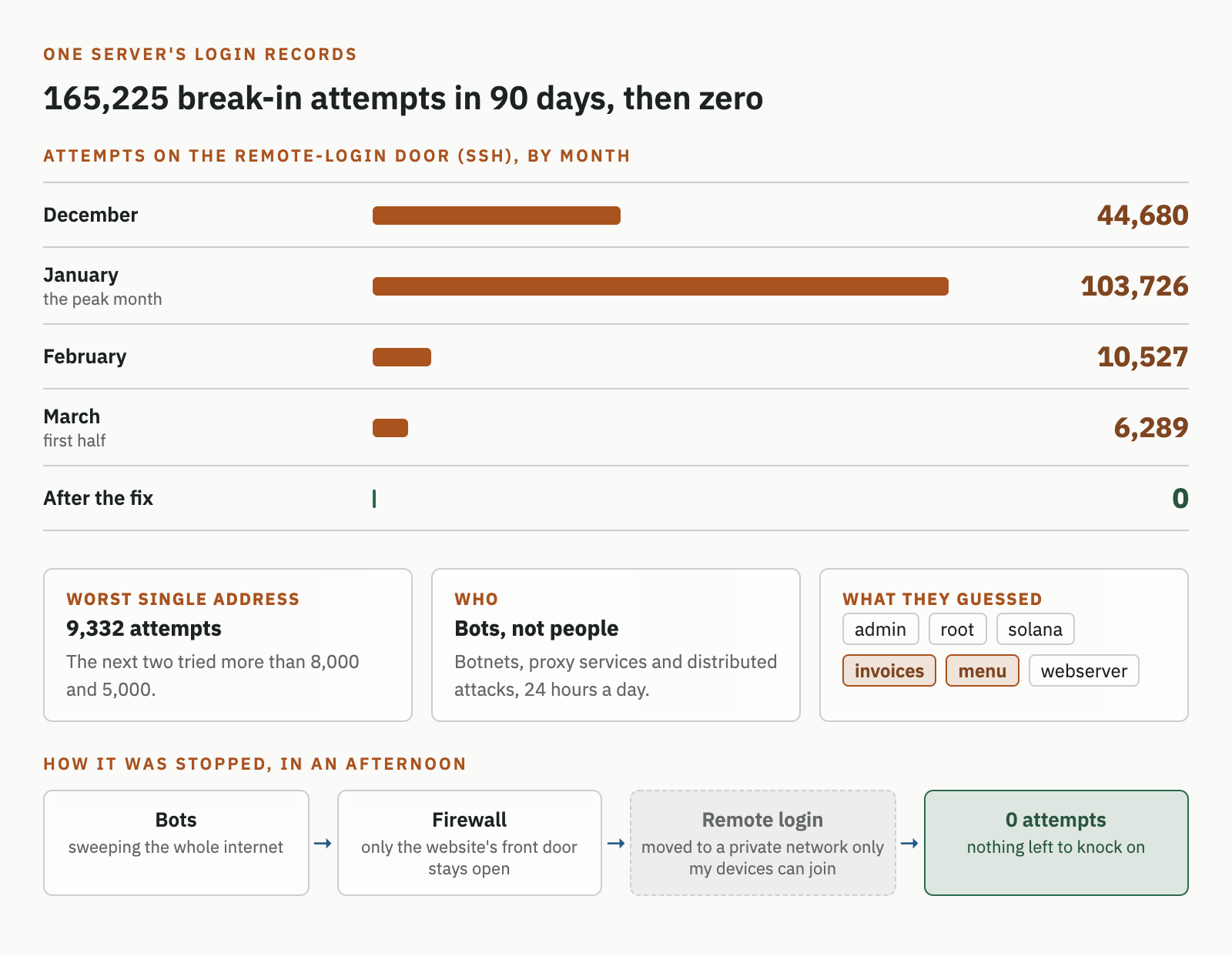
Your business is probably being attacked right now, and not by anyone who knows your name. When I checked the login records on one of my servers earlier this year, bots had tried to break in 165,225 times in 90 days. Every attempt was aimed at the remote-login door developers use to manage a server from anywhere (it's called SSH).
| Month | Attempts |
|---|---|
| December | 44,680 |
| January | 103,726 |
| February | 10,527 |
| March (first half) | 6,289 |
The single worst address tried 9,332 times, and the next two tried more than 8,000 and 5,000. The traffic came from botnets (networks of hijacked computers) in Eastern Europe, proxy services and distributed attacks, running 24 hours a day.
None of it was personal. These were bots sweeping the whole internet for any machine that answers.
What they were looking for
The usernames they guessed tell you what they want:
admin,root,user: the defaults. If nobody changed them, that's the whole attack.solana,moon: crypto wallets, hoping someone left one on a cheap server.invoices,menu: business databases. Someone expects to find a restaurant's ordering system or a small firm's billing server behind a guessable login.webserver,vhserver: infrastructure accounts created by common hosting tools.
The invoices and menu guesses are the ones local business owners should notice. Those wordlists weren't built for big companies. They were built for businesses like yours: a server set up for the booking system years ago by a developer who has since moved on.
How I stopped it
The fix took an afternoon, following a tip from @levelsio:
- A firewall that closes every door the public doesn't need. A website only needs its front door, the one browsers use. Everything else gets locked.
- The remote-login door moved onto a private network that only my own devices can join (I use Tailscale). From the public internet it's no longer there at all, so to a bot the door simply doesn't exist.
The result: zero attempts. Not fewer. Zero, because there's nothing left to knock on.
The dark side of AI for small businesses
It's easy to talk only about what AI does for your business. The uncomfortable part is what it does for the people attacking it. AI has made attacks cheaper to run, easier to automate and harder to tell apart from real customers:
- Automated bots at scale. Scanning, guessing passwords and probing for known weaknesses used to take skill. Now it's a script anyone can rent, running around the clock, like the traffic in my logs.
- Fake sign-ups and enquiries. AI writes convincing enquiry forms, booking requests and account sign-ups in any language. They clog your inbox, waste your team's time, skew your marketing numbers and are sometimes the first step of a scam.
- Traffic floods and DNS attacks. Distributed attacks can knock a small site offline or hijack where your domain points, and small businesses usually find out from a customer.
The numbers back this up, including here in Singapore:
- The Cyber Security Agency of Singapore recorded 159 ransomware cases in 2024, up 21% from 132, with SMEs the most affected.
- In a 2025 PDPC decision, a local company had protected admin access with weak, guessable passwords such as "Password@1". The personal data of 190,589 people was later put up for sale, and the company was fined S$17,500.
- IBM's Cost of a Data Breach 2026 found that one in four malicious breaches was AI-enabled, costing about US$6 million on average.
This isn't a reason to avoid AI. It's a reason to put the same kind of automation to work on defence.
What I help businesses put in place
I've worked on fraud before. At Rakuten I helped remove users who were abusing our advertising SDK, and the same thinking applies to small businesses now, at a fraction of the cost:
- Fraud screening for new sign-ups, which flags disposable emails, suspicious patterns and bot behaviour before an account is created.
- Enquiry filtering, which separates real customers from spam, scams and AI-generated junk, so your team only answers the ones worth answering. You can try a version of this on the Tools page.
- IP and traffic protection for your web apps, covering firewall rules, rate limits, a service such as Cloudflare in front of your site, and admin access moved off the public internet.
And a second risk: where your data goes
Security isn't only about who can break in. It's also about where your information goes when you send it out, and with AI tools that happens every time someone on your team pastes in a customer email, a contract or a spreadsheet.
The major AI providers do publish clear policies, but they differ by plan:
| Consumer plans | Business plans and the API | |
|---|---|---|
| ChatGPT (OpenAI) | Free and Plus content can be used to train models unless you turn off "Improve the model for everyone" in Data controls | Business, Enterprise and API content is not used for training by default |
| Claude (Anthropic) | Free, Pro and Max chats are used for training only if you choose to allow it | Team, Enterprise and API content is not used for training by default |
Policies change, so check the providers' own pages before you rely on this: OpenAI and Anthropic.
Two practical points follow:
- Put your team on a business plan, not personal accounts. Staff pasting client data into a free personal account is the most common data leak I see in small businesses, and it's entirely avoidable.
- "Not used for training" isn't the same as "never leaves your building". Even on business plans, your data is processed on the provider's servers and may be kept for a period for safety monitoring. For most businesses that's an acceptable trade-off. For some, such as clinics, law firms, financial advisors, or anyone holding sensitive personal data under PDPA, it may not be.
If you need a truly private setup where nothing leaves your own machine, the answer is to run an AI model yourself. It's more achievable than it sounds, and I wrote a step-by-step guide: How to run your own private AI model, step by step.
Originally posted on X
168K views, 1,352 likes and more than 1,600 bookmarks. Clearly I wasn't the only one who had never looked at their logs.

